 Face Recognition
SW-ZCFE series
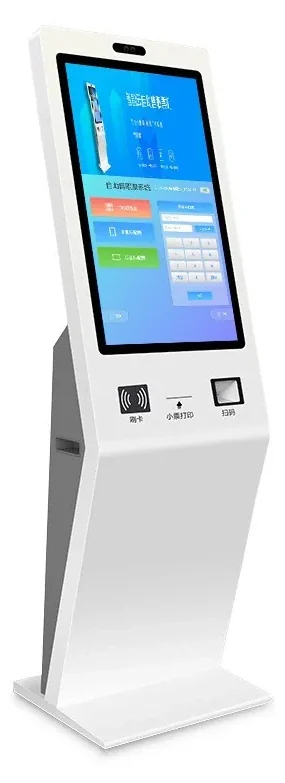
SW-ZCFE-21.5 21.5-Inch Self-Service Terminal
A floor-standing Android terminal for visitor registration, identity checks and self-service.
When the entrance needs more than a face check, the 21.5-inch SW-ZCFE adds a large touch screen, Android 11, ID/QR modules and optional printing or card dispensing. It is designed for lobbies, reception desks and staff service points.
- Display
- 21.5-inch IPS, 1920 × 1080, 16:9
- Touch
- Capacitive touch
- Operating system
- Android 11
- Processor
- RK3568, 2 GB RAM + 32 GB storage
Quick answer
Model SW-ZCFE-21.5: Display: 21.5-inch IPS, 1920 × 1080, 16:9 · Operating system: Android 11 · Processor: RK3568, 2 GB RAM + 32 GB storage. 12 specifications, 5 FAQs. Final configuration and lead time are confirmed from the door list.
- Model datasheet and wiring diagram with the shipment
- Project consolidation and sample testing
- English / Chinese technical support
SW-ZCFE-21.5 is a floor-standing self-service terminal built on Android 11 with an RK3568 processor, 2 GB RAM and 32 GB storage. The 21.5-inch 1920 × 1080 capacitive display gives enough space for forms, instructions and a live camera view, while the 2 MP dual-lens camera handles face capture and live detection.
The terminal supports Ethernet, Wi-Fi and optional 4G, with RS485, RS232, Wiegand 26/34 and relay outputs for peripheral integration. Optional modules include IC/NFC reading, ID-card reading, QR code scanning, a 58 mm printer and a card dispenser. That makes it suitable for visitor registration, exam identity verification, HR self-service and factory onboarding.
The terminal stores 50,000 faces and 100,000 records and runs from a standard AC supply. It is intended for indoor lobbies; for an outdoor gate, pair it with the SW-HA series wall terminals. Because self-service workflows are project-specific, share the screen flow and peripheral list so the software can be configured before delivery.
Face Recognition Terminals: what it solves at the door.
21.5-inch 1920 × 1080 capacitive touch display
Android 11 with RK3568, 2 GB RAM and 32 GB storage
2 MP dual-lens face capture with live detection
Optional ID reader, QR scanner, printer and card dispenser
Ethernet, Wi-Fi and optional 4G connectivity
RS485, RS232, Wiegand and relay interfaces
Specifications
| Display | 21.5-inch IPS, 1920 × 1080, 16:9 |
|---|---|
| Touch | Capacitive touch |
| Operating system | Android 11 |
| Processor | RK3568, 2 GB RAM + 32 GB storage |
| Camera | 2 MP dual-lens |
| Face capacity | 50,000 faces |
| Record capacity | 100,000 records |
| Optional modules | IC/NFC, ID card reader, QR scanner, 58 mm printer, card dispenser |
| Network | Ethernet, Wi-Fi, 4G optional |
| Interfaces | RS485, RS232, Wiegand 26/34, relay output, USB |
| Installation | Floor standing |
| Application | Indoor lobby / reception |
Typical applications
These are the typical deployment scenarios for this model. Lane count, mounting height and interfaces are confirmed against the site plan.
Office Buildings
A calm lobby with controlled lanes, visitor passes and a clear audit trail.
Campuses
One student credential across gates, dormitories, libraries and classrooms.
Hospitals & Clinics
Separate public, patient and staff flows without adding friction at the door.
Selection note
Specifications follow the product documentation; batch or configuration differences may apply. Confirm the model, interfaces and accessory list before ordering.
Align the configuration and installation conditions.
Selection table — match the terminal to the entrance
| Entrance condition | Recommended configuration |
|---|---|
| High-traffic office lobby | 8-inch face terminal, 50,000-face capacity, Wiegand/relay to the lane controller |
| Covered outdoor gate | IP66 terminal with sunshade and dual-camera live detection |
| Visitor-heavy entrance | Face + QR + ID-card terminal with a platform visitor workflow |
| Factory with dust or gloves | Face-first terminal with card fallback; covered mounting position |
| Existing card controller | Use the face terminal as a Wiegand reader; keep the existing controller |
Installation table — what to check before handover
| Item | Typical setting |
|---|---|
| Mounting height | 1.4–1.5 m to the camera for adults; lower for children or wheelchair users |
| Power | DC 12 V at the door; share with the lock only if the supply is sized for both |
| Network | Ethernet to a switch; fixed IP if the platform requires it |
| Outputs | Wiegand or relay; confirm the controller format and lock current |
| Light | Avoid direct sun and strong backlight; add a sunshade where needed |
| Enrolment | Use standard photos and test with real users before rollout |
Frequently asked questions
Can the terminal print visitor badges?
Is it suitable for outdoor use?
Can we load our own Android application?
How many faces and records does it store?
Does it include a card dispenser?
Still have a question? Contact
Other options in the same family or scenario.
Ask about the SW-ZCFE-21.5 configuration and price.
Tell us the quantity, target country, door type and the controller or platform you use. We will reply with the configuration, accessory list and lead time.
- Quantity and project stage
- Target country, voltage and plug type
- Existing controller, turnstile or platform model
Inquiry: SW-ZCFE-21.5
Share the site type, number of doors or apartments, and the functions you need. We will reply with a recommended configuration and a quotation.
Need to compare this model inside a full system?
Open an application guide to see where it sits in a real entrance, what it pairs with and what to check before deployment.