
Access Control Management Software
Software is where permissions, records and reports live. Check device compatibility, language support, deployment model and backup before committing.
- 1 detailed models
- 1 models in index
- EN / 中文 support
Quick answer
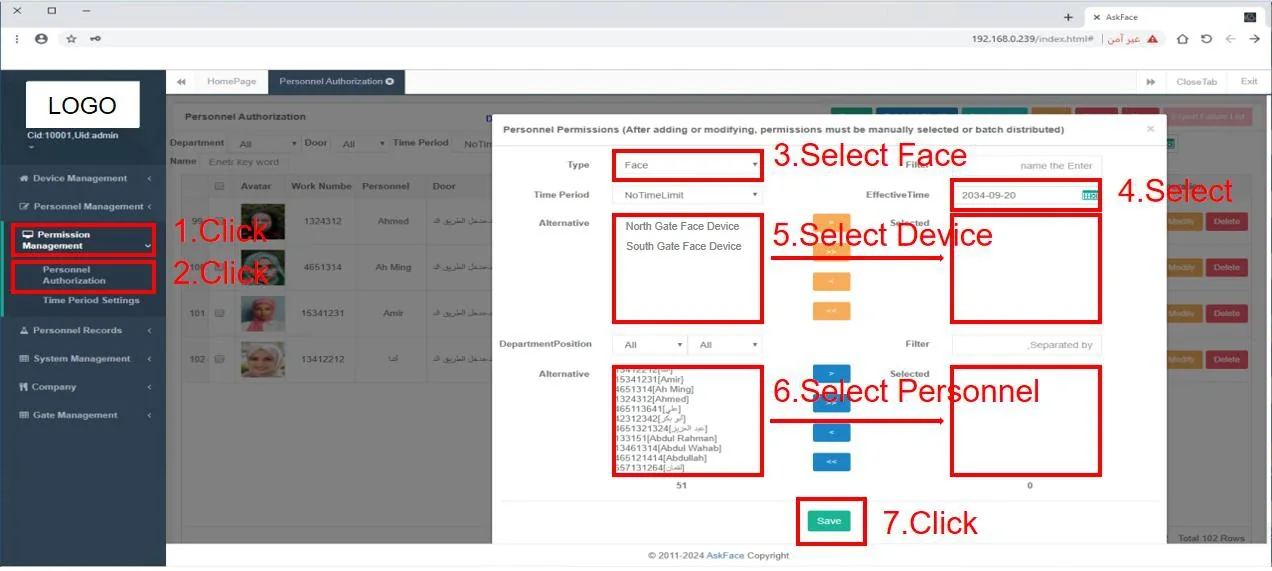
1 detailed models and 1 indexed models. Typical specifications: Deployment: Local server, browser access · Device management: IP / serial number registration · People management: Personnel, departments, positions, bulk Excel import. Final selection depends on the door count, cable and platform; send the door list for a configuration.
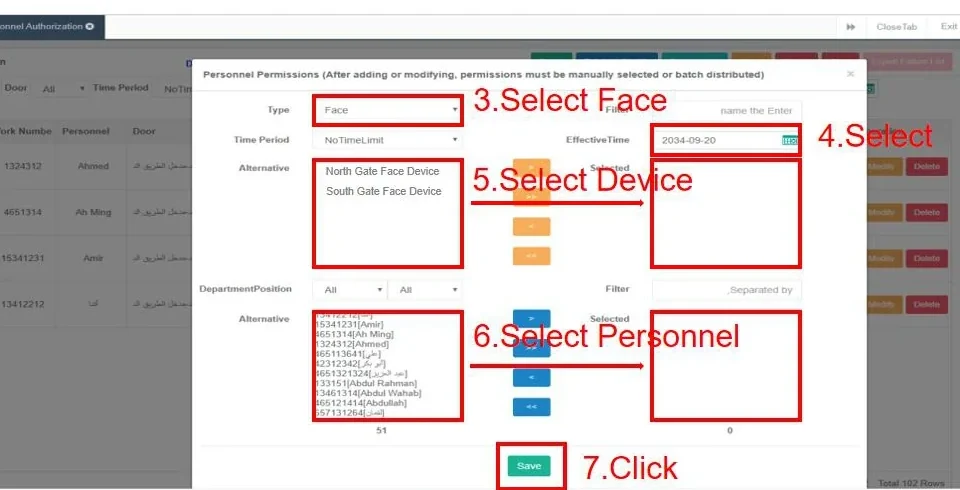
1 models in this category.
One category image represents multiple models; the models are listed by series on the right. Models with a detail page link straight through.
Other models
Compare the essentials, then open the detail page.
| Model | Category | Key specifications | |
|---|---|---|---|
| AskFaceBS | Browser-Based Access Control Software | Deployment: Local server, browser accessDevice management: IP / serial number registrationPeople management: Personnel, departments, positions, bulk Excel import | View details |
Select by entrance, then check the installation.
Selection table — deployment and device fit
| Requirement | Recommended configuration |
|---|---|
| On-premise management | Local server with browser access on the same network |
| Multi-site management | Network/VLAN design and a central server location |
| Mixed device fleet | Confirm supported models and firmware before ordering |
| Roles and audit | Admin, operator and guard roles with operation logs |
| Language | English/Chinese interface and reports |
Installation table — server and operations
| Item | Typical setting |
|---|---|
| Server | Specs, OS, database and backup storage |
| Network | Fixed IP, firewall rules and a device subnet |
| Accounts | Role-based accounts; MFA where available |
| Data | Import template and photo requirements confirmed |
| Backup | Scheduled backup and a restore test |
| Training | Admin and operator training before go-live |
Frequently asked questions
Is the software cloud-based or on-premise?
Which devices are compatible?
Can we import staff from Excel?
Does it support multiple administrators?
Still have a question? Contact
Where this family is typically used.
Send the door list. We will reply model by model.
Tell us the door type, lane count, existing cable and platform interface. We will return a configuration and the questions that still need answers.