
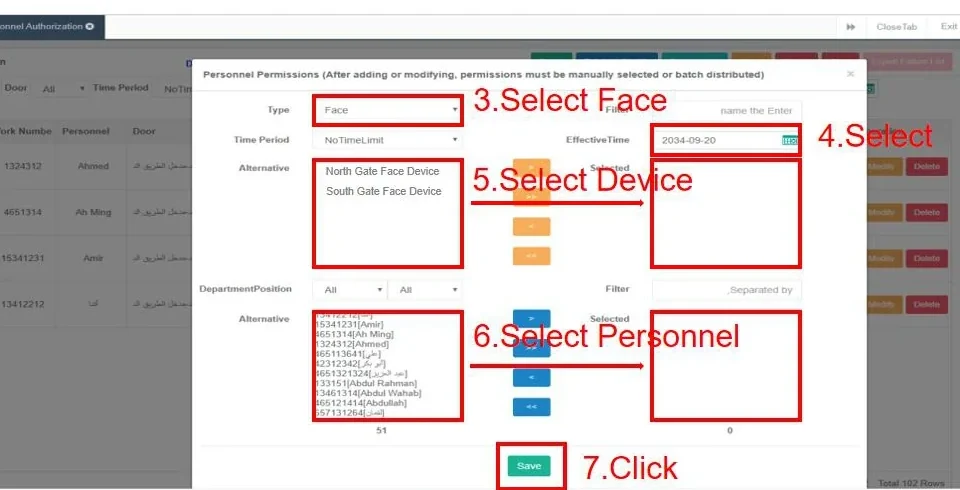
 Software
Management platform
AskFaceBS Browser-Based Access Control Software
Manage devices, people, permissions and records from a browser on the local network.
A browser-based access control platform for projects that standardise on connected terminals, controllers and turnstiles. It covers device registration, personnel records, access levels, time zones, bulk import, records, large-screen monitoring and role-based accounts.
- Deployment
- Local server, browser access
- Device management
- IP / serial number registration
- People management
- Personnel, departments, positions, bulk Excel import
- Permission model
- Access levels, time zones, holidays, batch issuing
Quick answer
Model AskFaceBS: Deployment: Local server, browser access · Device management: IP / serial number registration · People management: Personnel, departments, positions, bulk Excel import. 9 specifications, 5 FAQs. Final configuration and lead time are confirmed from the door list.
- Model datasheet and wiring diagram with the shipment
- Project consolidation and sample testing
- English / Chinese technical support
AskFaceBS runs on a local server and is accessed from a browser, so administrators do not need to install a client on every PC. The platform manages devices by IP and serial number, including face terminals, controllers and turnstiles. Personnel records, departments and positions are maintained centrally, and permissions can be issued in batches to selected devices.
Access levels are built from time zones and holidays, so a door can be open during working hours and locked after hours without changing each person. The platform records entry events, supports bulk import from an Excel template, and provides a large-screen view for real-time records or occupancy. Role-based accounts and operation logs separate administrators from operators.
Use it for office buildings, campuses, industrial parks and residential communities that use compatible devices. The platform is not a cloud service by default; it runs on a server on the same network as the devices. Confirm the device models, server specification, licence scope and language requirements before deployment.
Management Software: what it solves at the door.
Browser-based administration on a local server
Device registration by IP and serial number
Personnel, departments, positions and bulk import
Access levels built from time zones and holidays
Batch permission issuing and record queries
Large-screen monitoring, roles and operation logs
Specifications
| Deployment | Local server, browser access |
|---|---|
| Device management | IP / serial number registration |
| People management | Personnel, departments, positions, bulk Excel import |
| Permission model | Access levels, time zones, holidays, batch issuing |
| Records | Entry records, queries, export |
| Large screen | Real-time records or occupancy display |
| Accounts | Role-based accounts and operation logs |
| Languages | English / Arabic interface options (per manual) |
| Compatible devices | Face terminals, controllers, turnstiles (model-dependent) |
Typical applications
These are the typical deployment scenarios for this model. Lane count, mounting height and interfaces are confirmed against the site plan.
Office Buildings
A calm lobby with controlled lanes, visitor passes and a clear audit trail.
Campuses
One student credential across gates, dormitories, libraries and classrooms.
Industrial Parks
Separate staff, contractors and vehicles without slowing the shift change.
Selection note
Specifications follow the product documentation; batch or configuration differences may apply. Confirm the model, interfaces and accessory list before ordering.
Align the configuration and installation conditions.
Selection table — deployment and device fit
| Requirement | Recommended configuration |
|---|---|
| On-premise management | Local server with browser access on the same network |
| Multi-site management | Network/VLAN design and a central server location |
| Mixed device fleet | Confirm supported models and firmware before ordering |
| Roles and audit | Admin, operator and guard roles with operation logs |
| Language | English/Chinese interface and reports |
Installation table — server and operations
| Item | Typical setting |
|---|---|
| Server | Specs, OS, database and backup storage |
| Network | Fixed IP, firewall rules and a device subnet |
| Accounts | Role-based accounts; MFA where available |
| Data | Import template and photo requirements confirmed |
| Backup | Scheduled backup and a restore test |
| Training | Admin and operator training before go-live |
Frequently asked questions
Does it run in the cloud?
Which devices are supported?
Can we import staff from Excel?
Does it support multiple administrators?
Can it show a live occupancy dashboard?
Still have a question? Contact
Other options in the same family or scenario.
Ask about the AskFaceBS configuration and price.
Tell us the quantity, target country, door type and the controller or platform you use. We will reply with the configuration, accessory list and lead time.
- Quantity and project stage
- Target country, voltage and plug type
- Existing controller, turnstile or platform model
Inquiry: AskFaceBS
Share the site type, number of doors or apartments, and the functions you need. We will reply with a recommended configuration and a quotation.
Need to compare this model inside a full system?
Open an application guide to see where it sits in a real entrance, what it pairs with and what to check before deployment.