
 Video Intercom
IP series
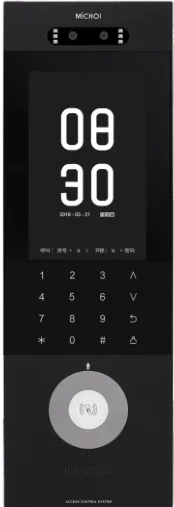
IP TY101T-HTD2 IP Video Intercom Kit
IP door entry for large residential complexes, long cable runs and high video quality.
An IP-based door entry kit for buildings with many apartments and long distances between the entrance and the units. Network cabling carries video, audio and unlock signals, and the door station can be powered from the indoor unit or a PoE switch.
- System type
- IP video door entry
- Outdoor camera
- AHD HD 2.0 MP, 1080P
- Camera angle
- 120°
- Door station size
- 168 × 82 × 35 mm
Quick answer
Model IP TY101T-HTD2: Outdoor camera: AHD HD 2.0 MP, 1080P · Camera angle: 120° · Door station size: 168 × 82 × 35 mm. 10 specifications, 5 FAQs. Final configuration and lead time are confirmed from the door list.
- Model datasheet and wiring diagram with the shipment
- Project consolidation and sample testing
- English / Chinese technical support
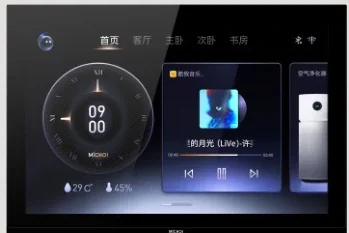
IP video intercom separates the door station from the indoor monitor by a network rather than a dedicated video cable. That makes it the right choice for large residential complexes, multi-building communities and projects where the gate is far from the apartments. The IP TY101T-HTD2 kit pairs an IP door station with indoor monitors and supports long cable runs with high video quality.
The outdoor unit uses an AHD HD 2.0 MP 1080P camera with a 120° viewing angle and a 168 × 82 × 35 mm flush-mount housing. It operates from -40 °C to +60 °C and can be powered by the indoor unit, a PoE switch or a dedicated door-unit supply. Unlocking is available from the indoor monitor or by card at the door station, with voltage or normally-closed unlock signals for the lock.
Typical installations include gated communities, apartment towers, serviced residences and mixed-use buildings. For a retrofit where re-cabling is difficult, compare the 2-wire models in the same catalogue; for a single villa, a dedicated villa kit is usually simpler. Share the building layout, apartment count and existing cabling so we can confirm the topology.
Video Intercom: what it solves at the door.
IP network transmission for long distances and multi-building sites
AHD 2.0 MP 1080P camera with 120° viewing angle
Indoor monitor, PoE switch or dedicated door-unit power
Unlock from indoor monitor or by card at the door
Flush-mount 168 × 82 × 35 mm door station
Operating range -40 °C to +60 °C
Specifications
| System type | IP video door entry |
|---|---|
| Outdoor camera | AHD HD 2.0 MP, 1080P |
| Camera angle | 120° |
| Door station size | 168 × 82 × 35 mm |
| Installation | Flush / flat installation |
| Power options | Indoor unit, PoE switch, or door-unit supply |
| Unlocking | Indoor monitor, card at door station |
| Unlock signal | Voltage signal; normally closed signal |
| Operating temperature | -40 °C to +60 °C |
| Maximum combination | 1 door station + indoor units (per kit) |
Typical applications
These are the typical deployment scenarios for this model. Lane count, mounting height and interfaces are confirmed against the site plan.
Office Buildings
A calm lobby with controlled lanes, visitor passes and a clear audit trail.
Residential Communities
A quiet, reliable entry experience for residents — and a clear record for management.
Hotels
Guest-friendly room access with staff doors that stay controlled around the clock.
Selection note
Specifications follow the product documentation; batch or configuration differences may apply. Confirm the model, interfaces and accessory list before ordering.
Align the configuration and installation conditions.
Selection table — start from the existing cable
| Building condition | Recommended system |
|---|---|
| Existing two-core cable | 2-wire kit, RVV2, up to 150 m |
| Existing four-core cable | 4-wire or AHD kit, up to 150 m |
| Network cable or new build | IP system with PoE and app/platform options |
| Multi-building or long distance | IP system with a network backbone |
| Single villa gate | 2-wire or 4-wire villa kit with a 7–10 inch monitor |
Installation table — power, cable and commissioning
| Item | Typical setting |
|---|---|
| Power | Indoor-powered 2-wire, local 12 V, or PoE for IP |
| Cable | RVV2 / RVV4 / Cat5e per kit; measure the actual route, not the plan |
| Monitor height | 1.4–1.5 m to the screen centre |
| Unlock | Confirm relay rating, lock type and fail-safe mode |
| Outdoor station | Canopy, drip loop, and avoid direct sun on the camera |
| Test | Day/night image, audio, unlock and app connection |
Frequently asked questions
What is the difference between this IP kit and a 2-wire kit?
How far can the door station be from the indoor monitor?
Can one door station call multiple apartments?
Does it support mobile app answering?
Can it unlock a magnetic lock or gate operator?
Still have a question? Contact
Other options in the same family or scenario.

Ask about the IP TY101T-HTD2 configuration and price.
Tell us the quantity, target country, door type and the controller or platform you use. We will reply with the configuration, accessory list and lead time.
- Quantity and project stage
- Target country, voltage and plug type
- Existing controller, turnstile or platform model
Inquiry: IP TY101T-HTD2
Share the site type, number of doors or apartments, and the functions you need. We will reply with a recommended configuration and a quotation.
Need to compare this model inside a full system?
Open an application guide to see where it sits in a real entrance, what it pairs with and what to check before deployment.